Filarr’s API is open: your encrypted databases, served to your software
Since October 27, 2026, every Filarr account can open a database to an API. Filarr Gate, a black box you run yourself, decrypts it and serves it to your ERP, your website or your AI assistant.
Mathis Belouar-Pruvot
· founder of Filarr · 9 min read
Short answer
Since October 27, 2026, a Filarr database can be opened to an API on every plan. Filarr Gate, a black box you install on your computer, your server or your Cloudflare account, decrypts your rows and serves them to your software. From Pro, a version hosted by Filarr also exists: databases entrusted to it are no longer end-to-end encrypted.
A Filarr database is end-to-end encrypted: our servers keep blocks they cannot read. That is what protects it, and until now it was also what kept it from talking to your other software. An ERP, a dashboard, a website or an AI assistant cannot read encrypted blocks.
Since October 27, 2026, Filarr’s API is open to every account. A database opens to an API from its menu, and Filarr Gate, a black box you run yourself, decrypts it and serves it to your software. With a black box on your side, Filarr’s servers still only see encrypted blocks.
This article walks through the whole path, from the database in Filarr to the first request, with screenshots of Filarr Gate 0.3.1. It also says what the black box does not do.
Why a black box, and not a regular API key
With most services, an API works like this: the server reads your data in plain text and hands it to whoever shows the right key. At Filarr that is impossible by design, since the server does not have the key to your databases, unless you choose to entrust it (see the hosted box, below).
Filarr Gate turns this around. It is a small program that you install, wherever you like:
- on your computer (
npx filarr-gate); - on a company server, as a Docker image (
ghcr.io/filarr-work/gate); - on your own Cloudflare account;
- or directly in your code (
npm install @filarr/gate).
It downloads the encrypted blocks of the databases you open to it, decrypts them with keys derived from its token, keeps the copy in memory and answers your software from that copy.
Filarr ──(encrypted blocks)──▶ Filarr servers ──(encrypted blocks)──▶ Filarr Gate ──(JSON)──▶ ERP, site, BI, AI
                                 read nothing                          on your side
Its code is public, under the Apache 2.0 licence: github.com/filarr-work/filarr-gate.
Step 1: open a database in Filarr
On a database, click ··· then Open to an API…. The form asks for:
- a name for the access (“Workshop ERP”, “Website”);
- the databases opened, each one Read or Read and write;
- the slugs, meaning the name of each database and each view in the API (
clients,active-clients).
Slugs are chosen once and for all. Renaming the database or a view afterwards breaks no integration.
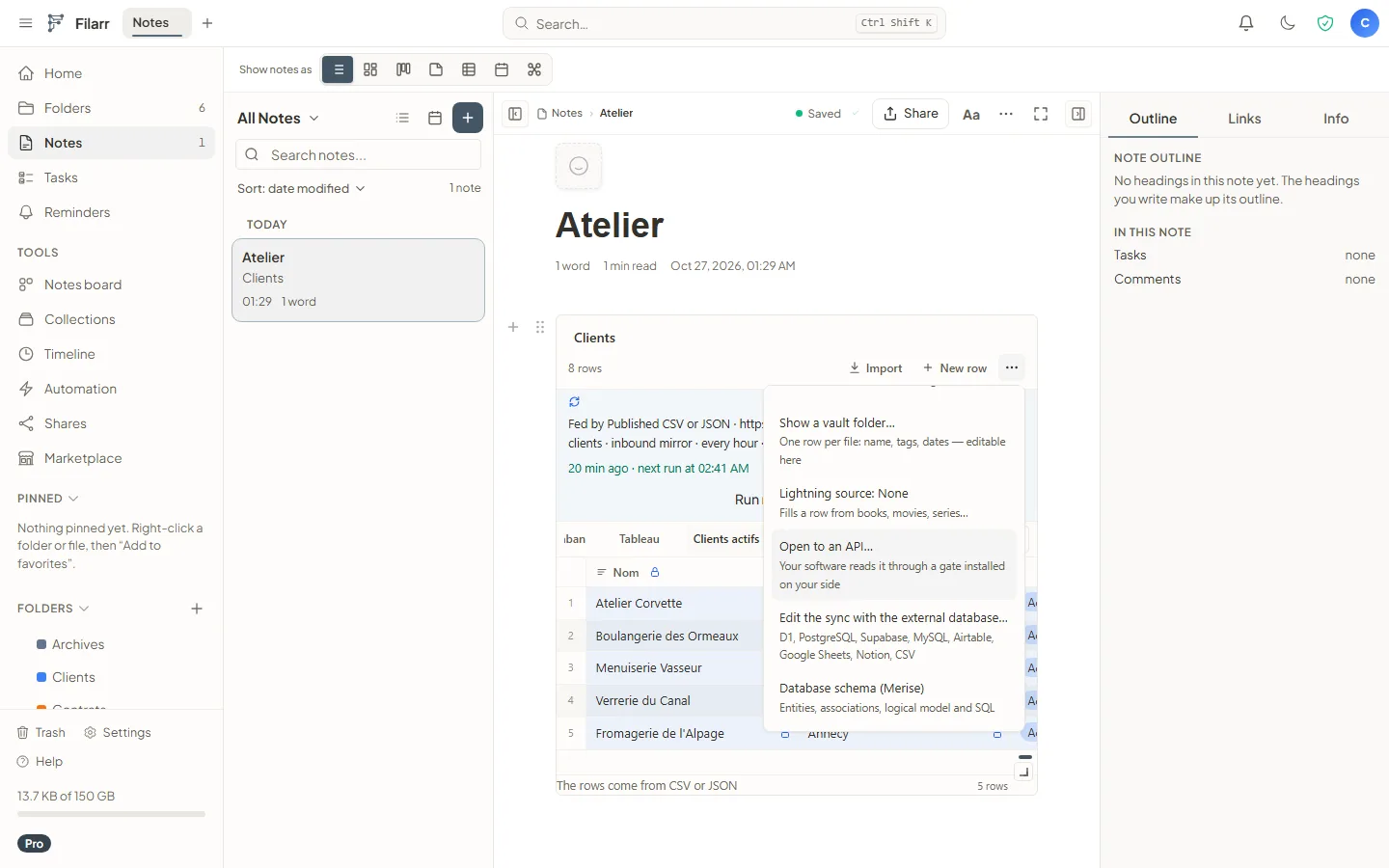
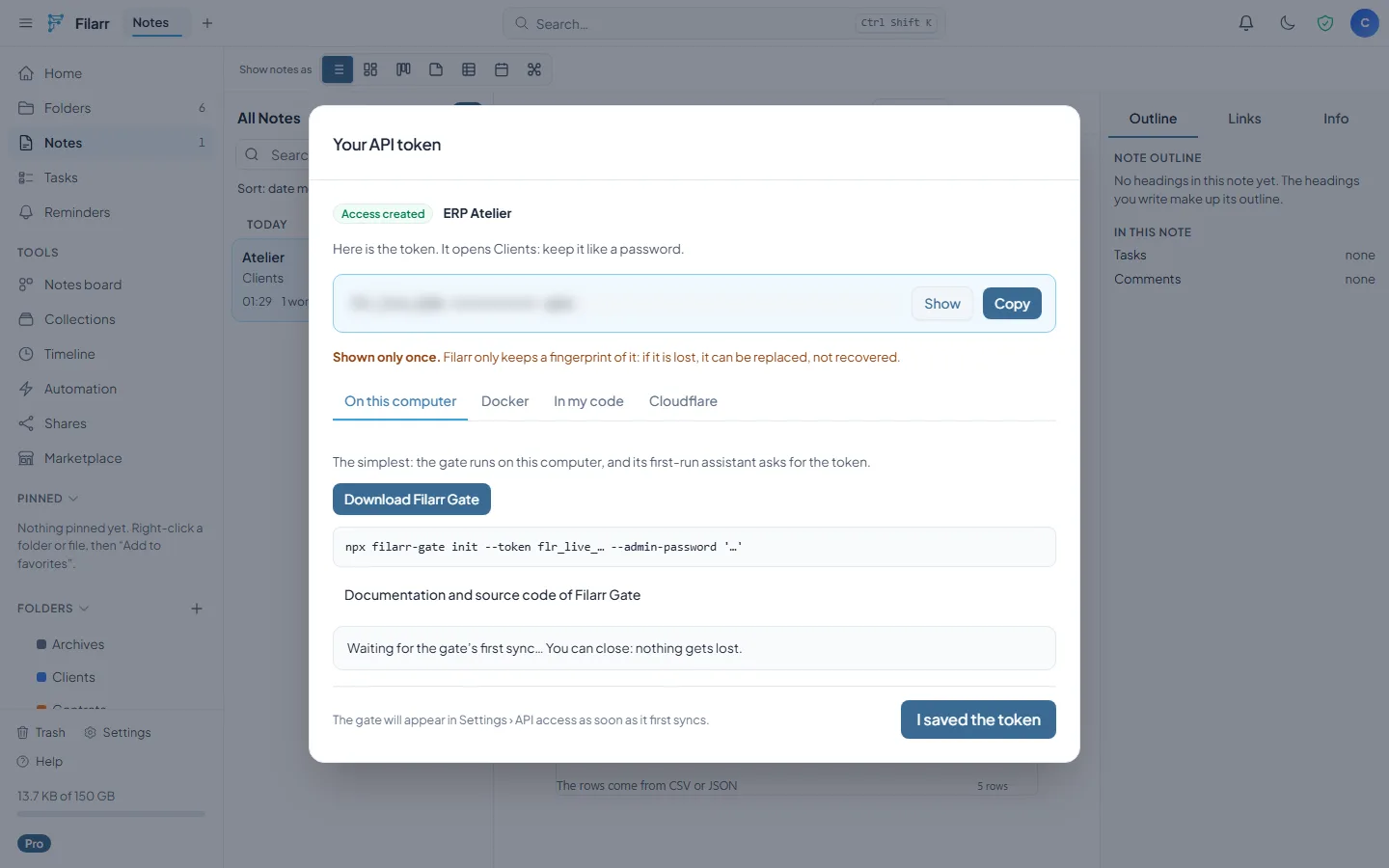
Filarr then shows a token, once. It only keeps a fingerprint: if lost, it can be replaced, not recovered. Whoever holds it reads the databases it opens, so treat it like a password.
Step 2: start the black box
On a computer, two commands are enough:
npx filarr-gate init --token flr_live_…
npx filarr-gate
The management interface opens at http://127.0.0.1:8787/admin/, in English or French. The dashboard shows the link with Filarr, the replicated databases, the requests served and what Filarr counts this month.
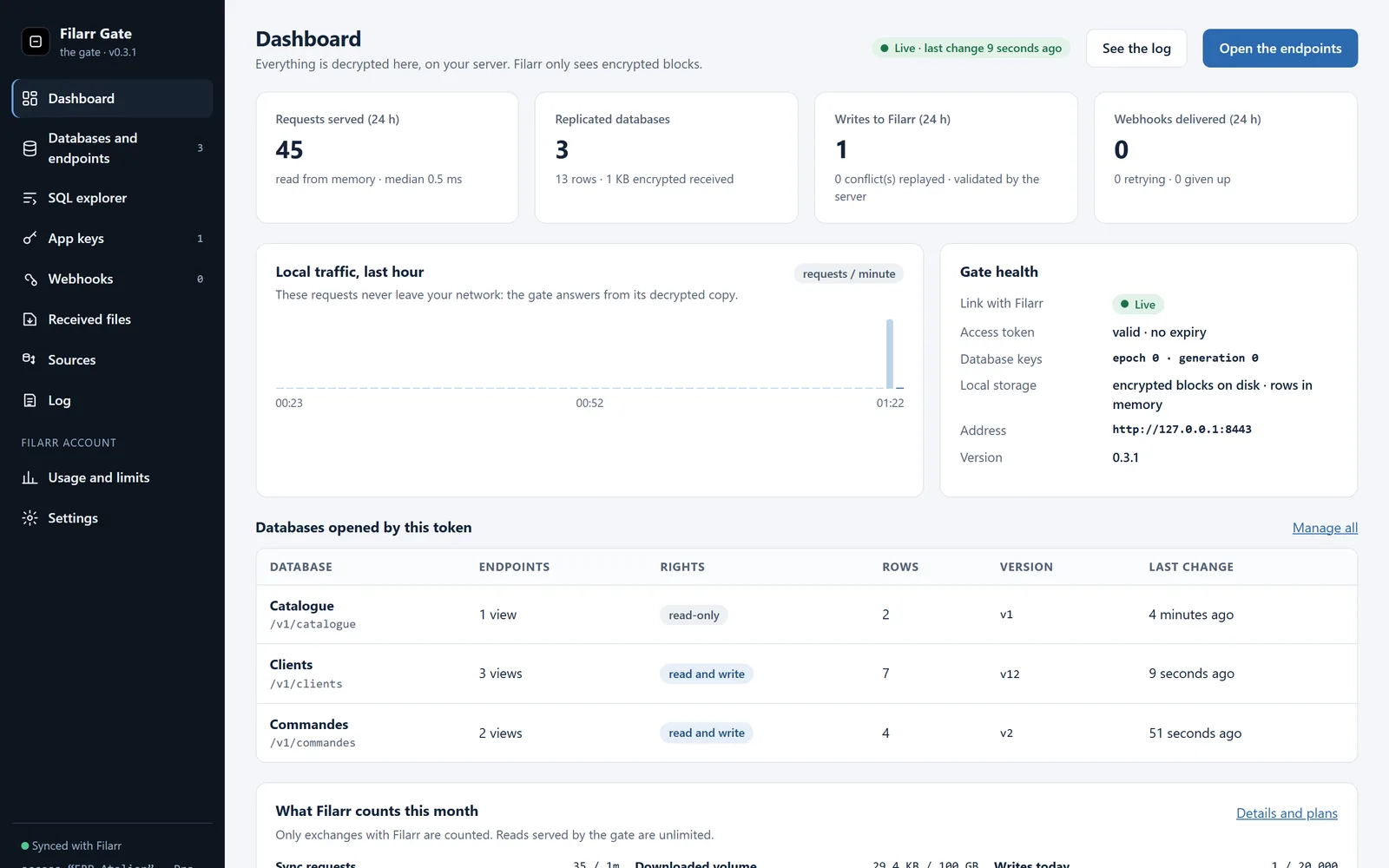
The screenshots in this article come from Filarr Gate 0.3.1, connected to the demo server shipped in its repository: the clients and orders are made up.
Step 3: endpoints drawn from your views
Each database becomes GET /v1/<database>, and each view GET /v1/<database>/<view>. The “Active clients” view keeps its filter, its sort and its columns: the view is the contract, and Filarr Gate replays it with Filarr’s own view engine. A database opened for writing also accepts POST, PATCH and DELETE.
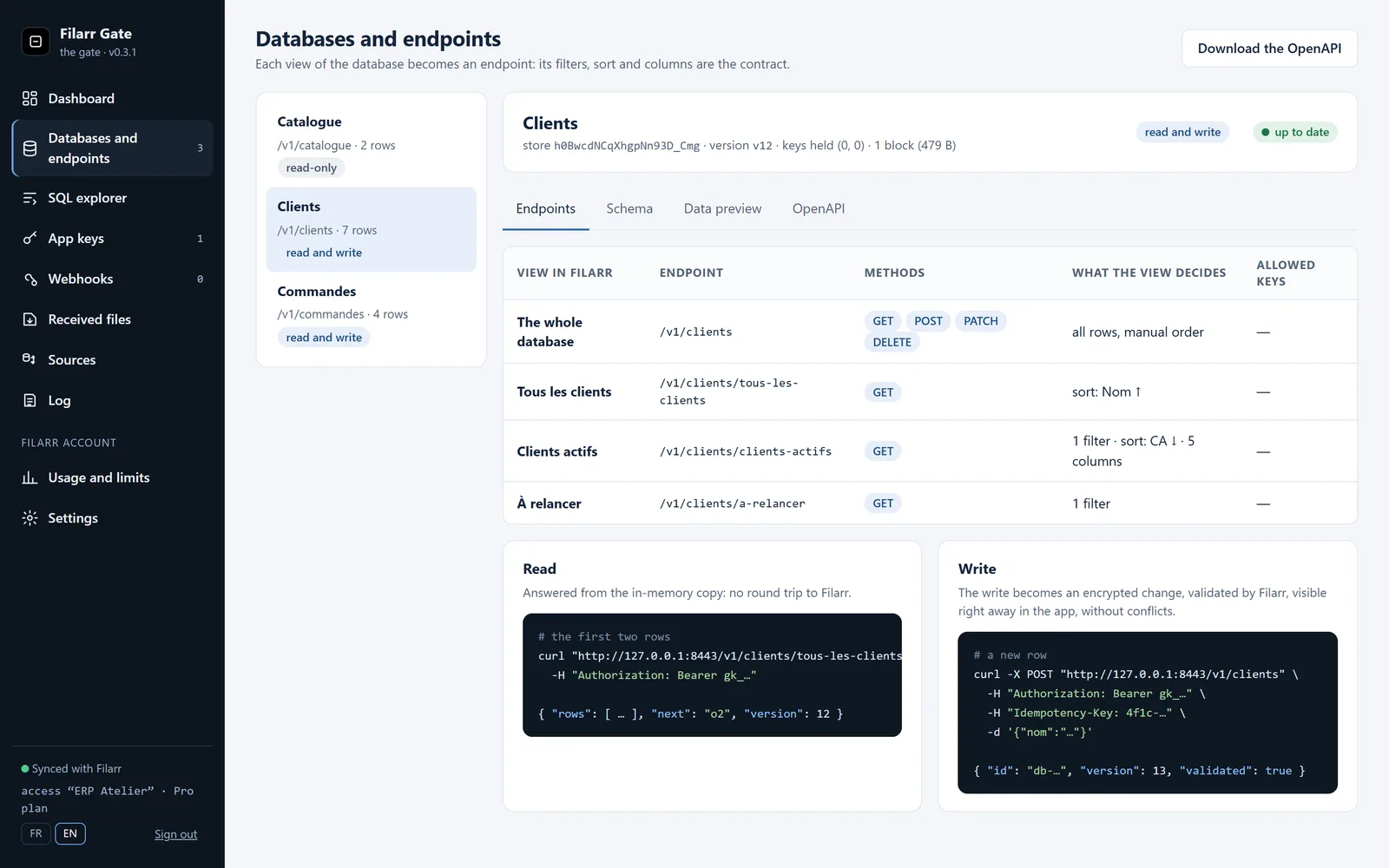
A write becomes an encrypted change, validated by Filarr like any device’s, and visible right away in the app:
curl -X POST "http://127.0.0.1:8443/v1/commandes" \
  -H "Authorization: Bearer gk_…" \
  -H "Idempotency-Key: order-1042" \
  -d '{"numero": "CMD-1042", "montant": 180}'
Step 4: one key per piece of software
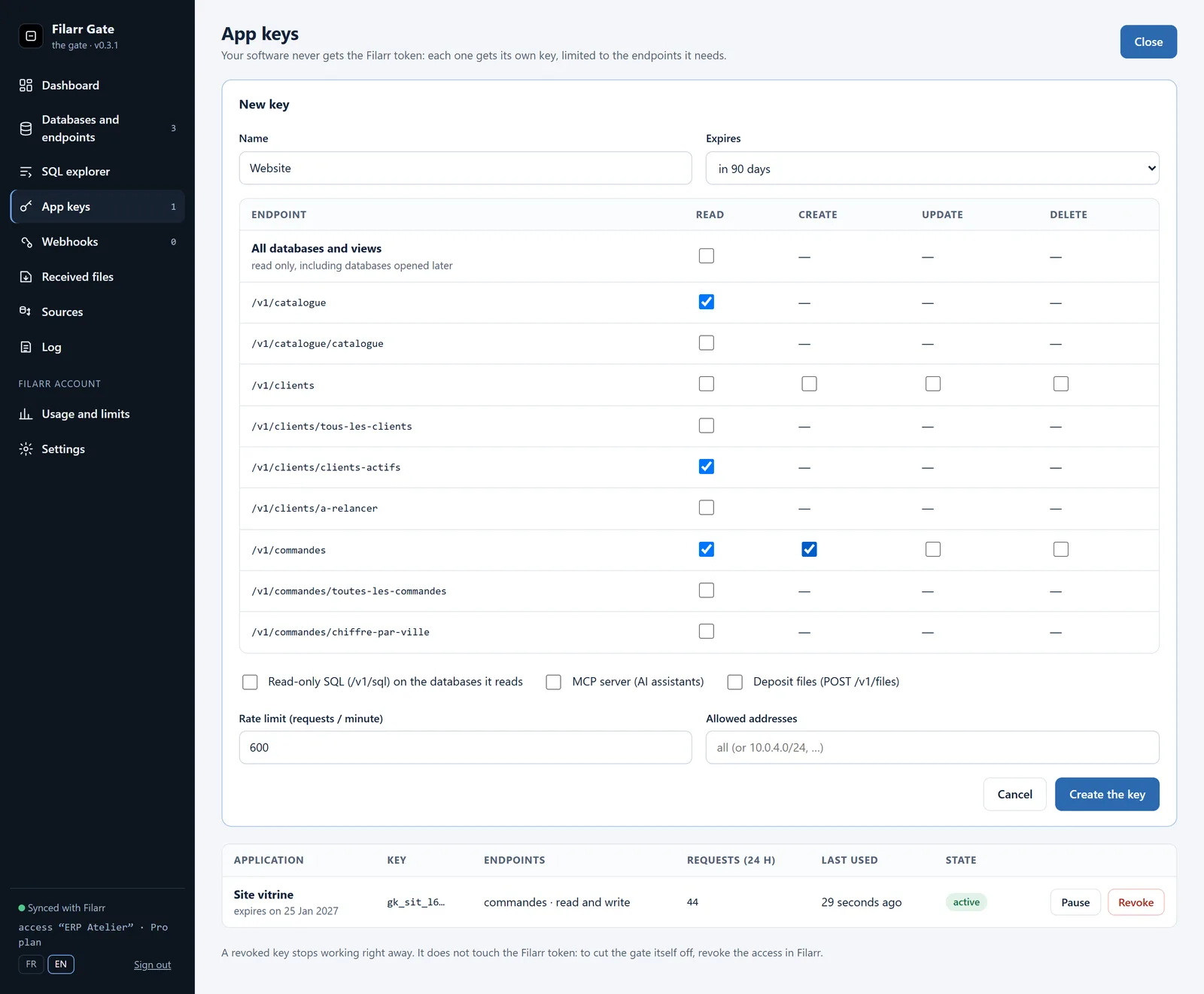
Your software never gets the Filarr token. Each one receives its own app key (gk_…) from the black box, limited to the endpoints it needs. Each key has:
- its rights, endpoint by endpoint: read, add, change, delete;
- a maximum rate, allowed addresses and an expiry date.
The website reads the catalogue and adds orders, nothing else. Revoking its key does not affect any other software.
Step 5: SQL, webhooks, and MCP for AI assistants
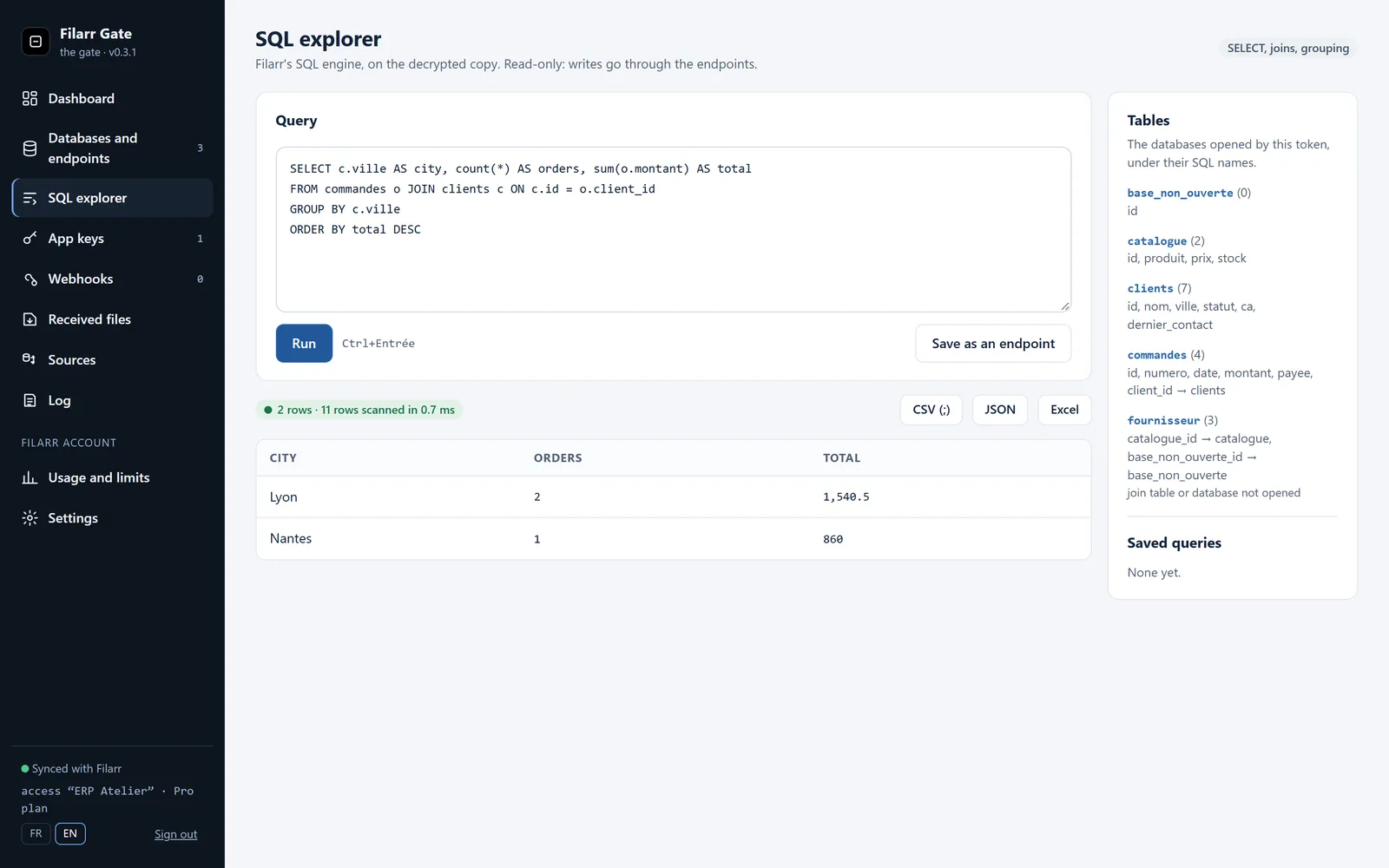
The SQL explorer runs a SELECT with Filarr’s SQL engine, joins and grouping included, on the decrypted copy. A useful query can be saved as an endpoint (GET /v1/q/<name>).
On top of that:
- signed webhooks (HMAC-SHA256) for every row added, changed or deleted;
- an OpenAPI 3.1 description generated from the column types;
- a read-only MCP server, so an AI assistant can query your databases. Whatever the assistant reads, it receives in plain text: choose it as you would choose any recipient of that data.
Step 6: everything is logged, on your side
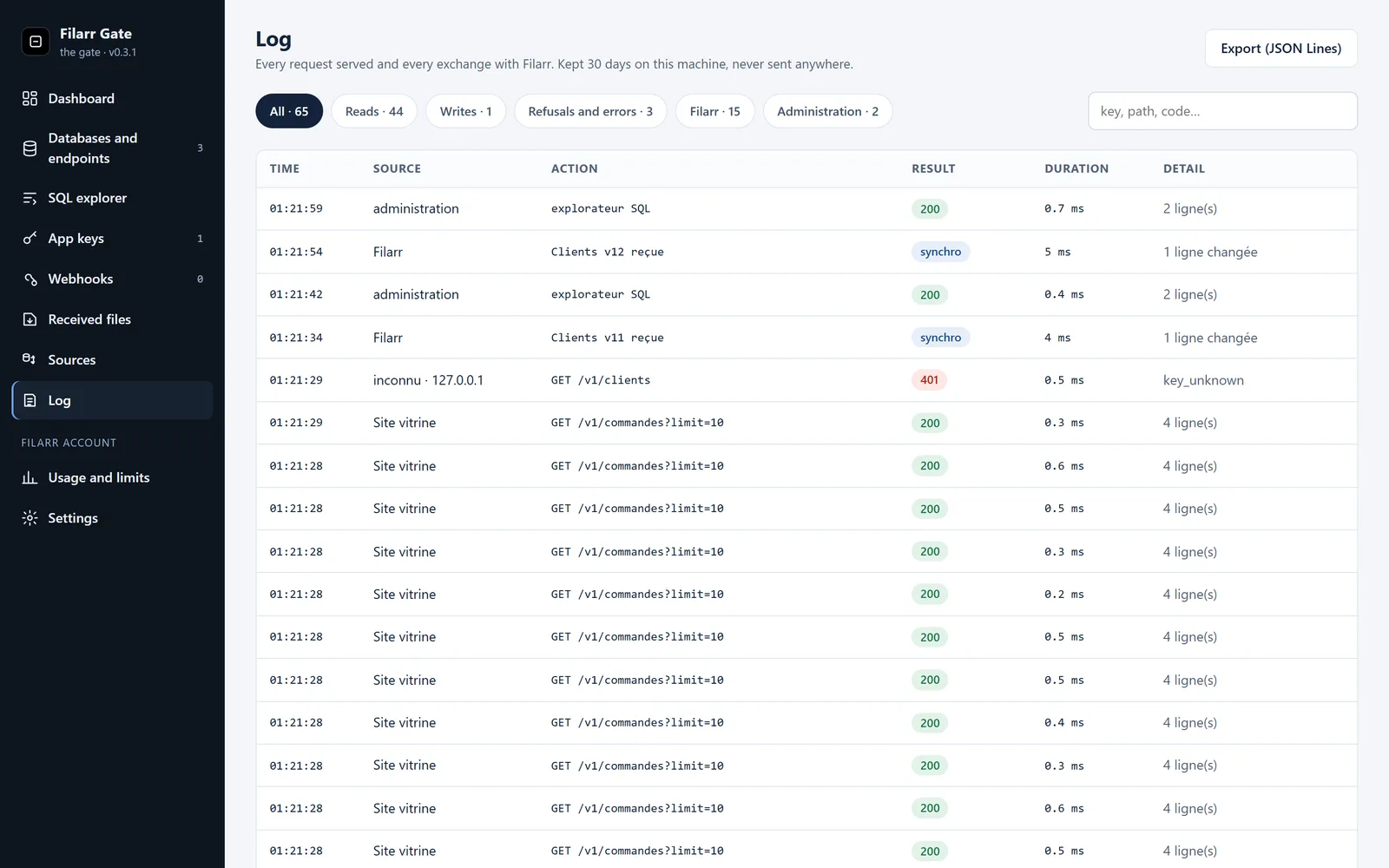
Every request served and every exchange with Filarr goes into the black box’s log. It is kept for 30 days on the machine and sent nowhere. It shows who read what, the refusals (an unknown key, here) and the syncs received from Filarr.
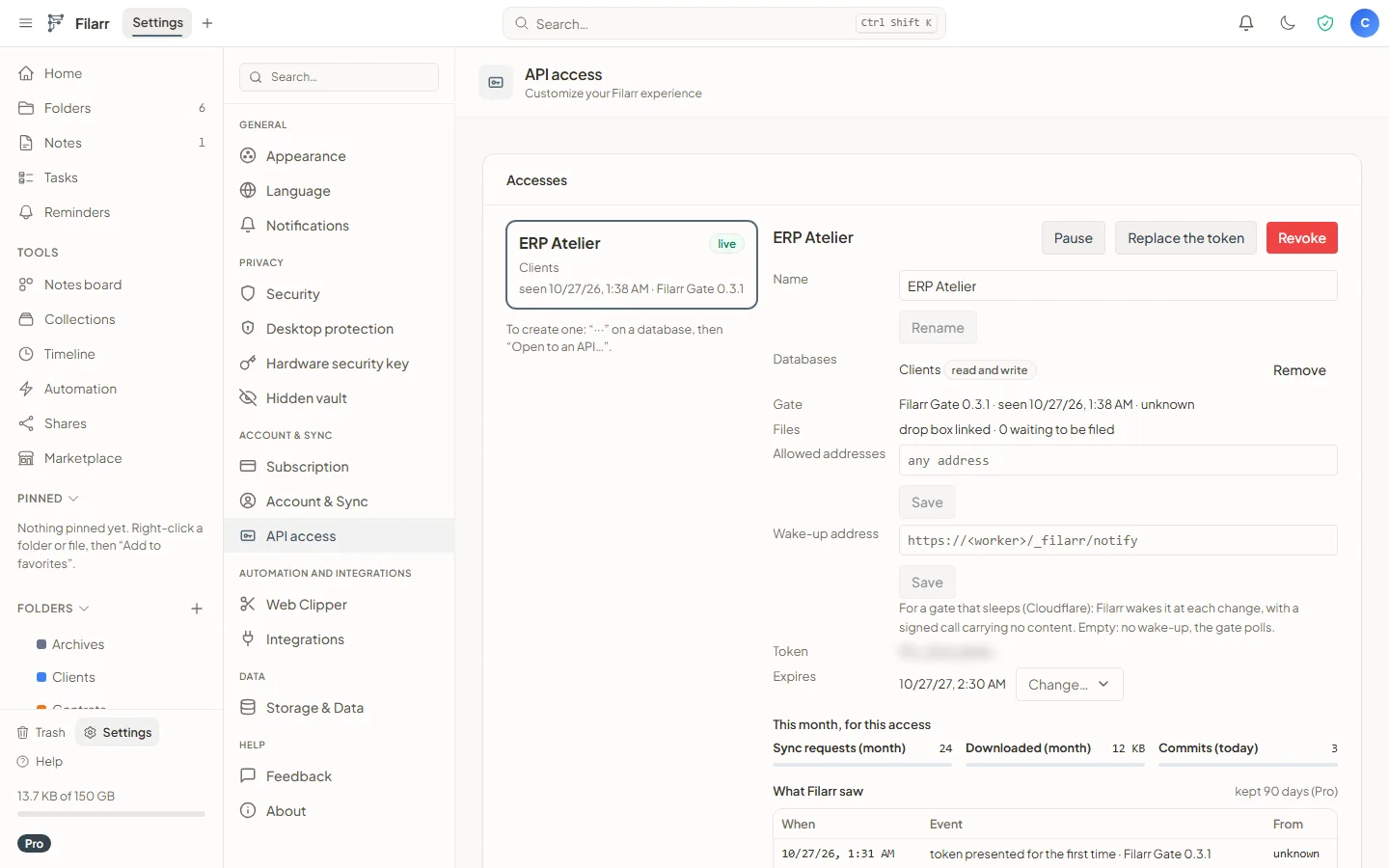
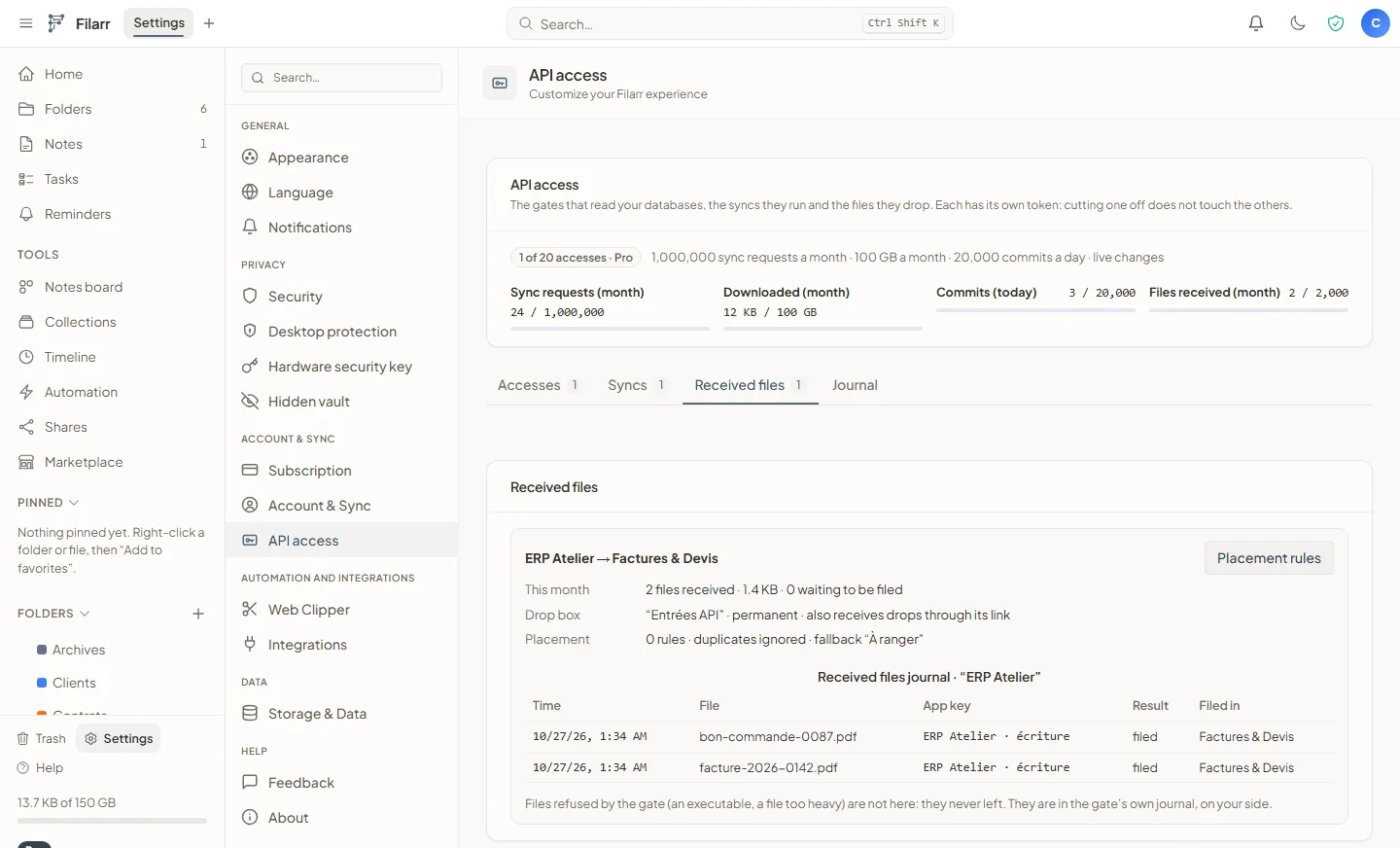
On the Filarr side, Settings › API access lists your accesses, their usage and each black box’s last visit. You can pause an access, replace its token or revoke it there.
Feed a database from an external database (Solo and up)
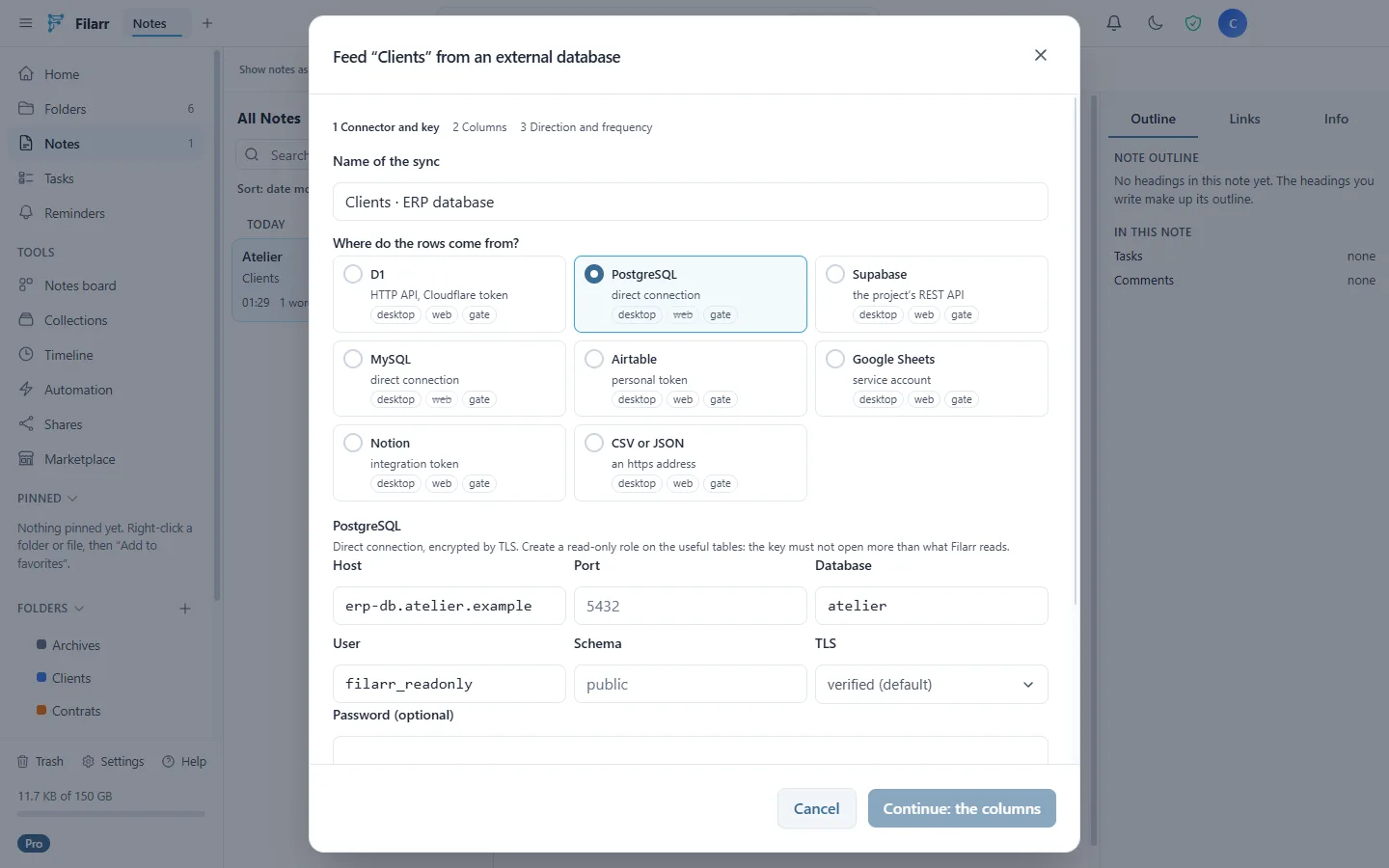
A Filarr database can also be fed from another database, or published to it: PostgreSQL, MySQL, Supabase, Cloudflare D1, Airtable, Google Sheets, Notion, or a published CSV or JSON. The sync is defined in Filarr (“···” › Feed from an external database…), one way, the other way or both.
It is run by one of your devices, or by your black box. In that case, the external database’s keys are given to the black box and never go through Filarr. A PostgreSQL database can only be set up from the desktop. On the web, calls to an external service go through a Filarr relay that keeps nothing; those exchanges are not end-to-end encrypted.
Receive files through the API (Pro and up)
An app key can drop files (POST /v1/files). They are sealed for one of your drop boxes, then the Filarr app decrypts them and files them by your placement rules. Invoicing software can drop each invoice into the right folder without Filarr reading it.
What each plan includes
Reads served by the black box do not go through Filarr: they are neither counted nor throttled. Only exchanges with Filarr are.
| Free | Solo | Pro | Teams | |
|---|---|---|---|---|
| API accesses | 1 | 3 | 20 | 100 |
| Databases per access | 1 | 3 | 20 | 100 |
| Writes from your software | no | 1,000 / day | 20,000 / day | 100,000 / day |
| Live changes | polled every 5 min | yes | yes | yes |
| Sync from an external database | no | yes | yes | yes |
| Files received through the API | no | no | 2,000 / month | 10,000 / month |
| Allowed addresses | no | no | yes | yes |
| Box hosted by Filarr | no | no | option, €4 / month | 1 included |
These are the figures returned by Filarr’s server on October 27, 2026. Enterprise uses the Teams figures, and the help centre details the plans.
What the black box is not
An API over encrypted data has limits. Better to know them before plugging in any software.
- Whoever runs the black box reads the databases. It holds the key to the databases it was opened to and keeps a decrypted copy in memory. Protect the machine as you would protect the data.
- A view is not a boundary. The black box reads the whole database it is opened to, not only what your views show. To share less, open a database that contains less.
- An offline black box keeps its copy. After a revocation, a black box that can no longer reach Filarr keeps what it already copied, until it reconnects or someone erases it on its machine.
- Filarr sees metadata. Its servers see encrypted blocks, counters, the black box’s IP address and version. They never see the token, a database key or a row.
- The box hosted by Filarr is the exception. It is an option, from Pro, at €4 a month or €48 a year. A Teams or Enterprise organisation has one box included, assigned by whoever manages its billing; for now from the web, with the desktop following in its next version. The databases you entrust to it are no longer end-to-end encrypted: their key is managed by our servers, which decrypt them to serve the API. An internal security review was done before it opened, on October 27, 2026; the external review is scheduled. Its terms are in the DPA annex and on the Trust Center.
- The Android app follows with its next version. A database opened to an API moves to Filarr’s large-database storage. The current Android app does not handle it yet: on the phone, that database may stay read-only until the next version.
Where to start
- Update Filarr on the desktop (3.10.0) or open the web app.
- Pick a small database, such as a catalogue or a client list, and open it to an API for reading.
- Run
npx filarr-gateand call its first view.
The help centre details each screen: Open a database to an API, Manage your API access and The black box, then Feed a database from an external database and Receive files through the API. Filarr Gate’s tutorials, with examples in curl, JavaScript and Python, are in its repository.