The Google Drive alternative, end-to-end encrypted.
Google Drive encrypts your files in transit and on its servers, but not end to end by default. Filarr encrypts everything on your device, before upload. Folders synced everywhere, like in Drive, with a complete note editor on top.
Short answer
Filarr is a Google Drive alternative that encrypts your files on your device before syncing them: our servers only store data they cannot read. You keep your documents in folders, and take your notes in a complete editor. Free with 5 GB, paid plans from €4 a month.
Checked
01 — What you keep
What you keep from Google Drive
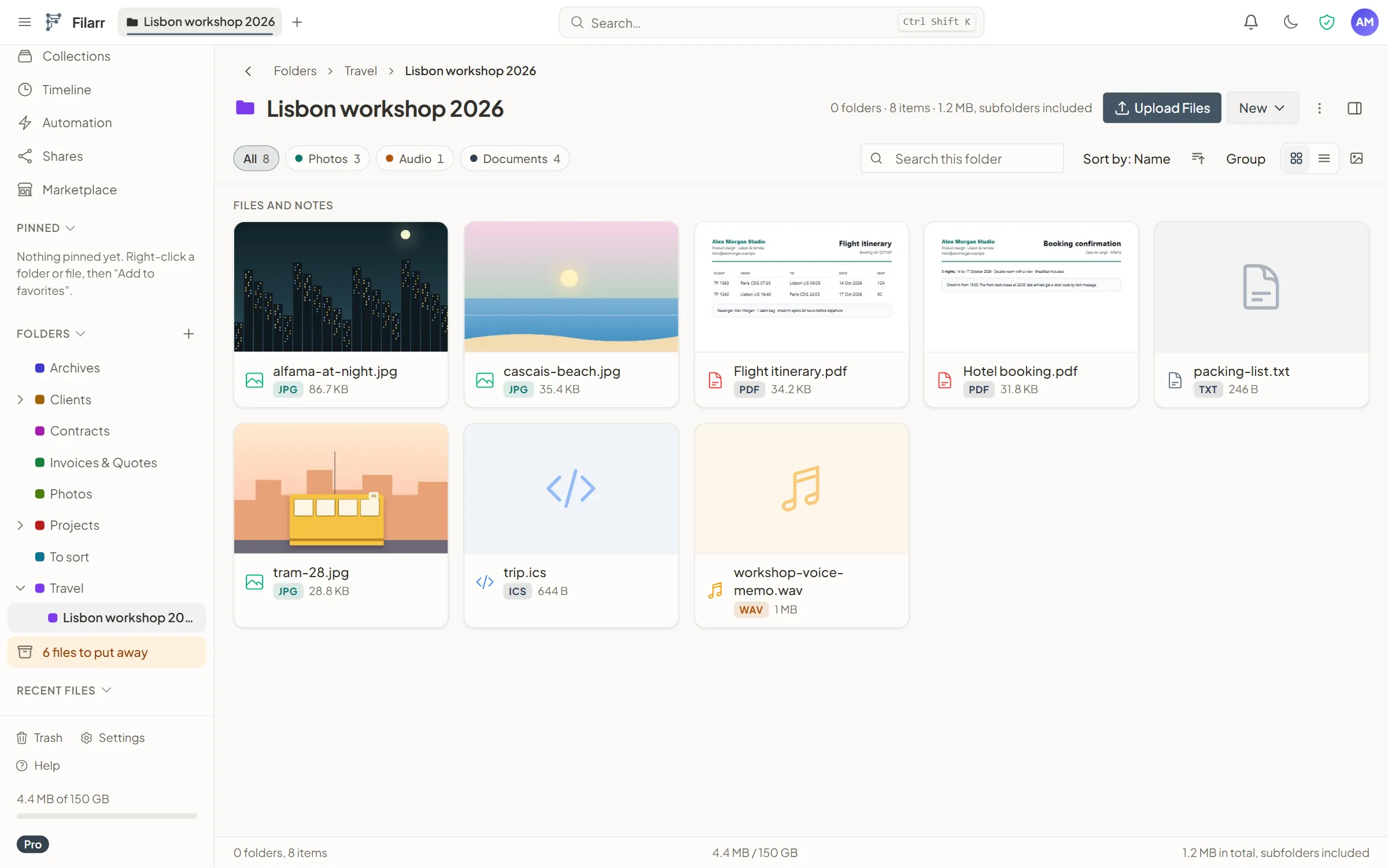
Folders synced everywhere
On Windows, Linux, and Android, and in the browser. On a computer, your files stay on your disk and open without a connection.
A preview of your files
More than 80 formats open right inside Filarr: PDFs, images, video, audio, Word documents, code, archives…
Sharing by link
A link to a file, with expiry, a download limit, a password and revocation. The file is encrypted on your device, and the key travels in the link.
Encrypted sharing02 — What Filarr adds
What Filarr does on top
End-to-end encryption
Every file is encrypted on your device, with its own key, before upload. Our servers only store encrypted data they cannot read.
How your files are encryptedA complete note editor
Blocks, tasks, tables, databases, a graph of links: your notes live next to your files, encrypted too.
Filarr vs NotionEncrypted shared vaults
Work together, with roles, and write in the same notes in real time, from the Solo plan.
Your own storage, if you want
With the Pro plan, your synced files can live in your own S3-compatible bucket: Amazon S3, Cloudflare R2, Backblaze B2, Wasabi, Scaleway, OVHcloud. They arrive there encrypted.
Use your own storage
03 — Side by side
Filarr vs Google Drive, side by side
| Feature | Google Drive | Filarr |
|---|---|---|
| End-to-end encryption | Not by default: encrypted in transit and at rest. End to end only in four Google Workspace editions | Yes: AES-256-GCM, on your device before upload |
| Free storage | Up to 15 GB, shared between Gmail, Drive and Google Photos | 5 GB |
| First paid plan | 100 GB for €1.99 a month (Google One Basic) | 25 GB for €4 a month (Solo) |
| Max file size | Up to 5 TB | 50 GB; a synced file must fit in your plan’s storage |
| Apps | Web, Windows, Mac, Android, iPhone and iPad | Web, Windows, Linux, and Android (Mac coming soon) |
| Copy on your disk | Yes, with Google Drive for desktop | Yes, with the desktop app |
| Editing together | Docs, Sheets and Slides, at the same time | Block notes and databases, in real time from the Solo plan |
| Use without an account | No: you sign in with a Google account | Yes, locally |
Based on Google’s help and pricing pages; its offering changes over time. Google One prices as shown for France.
Checked
04 — Honestly
Where Google Drive is still better
More space, for less
Up to 15 GB free, shared between Gmail, Google Drive and Google Photos, against 5 GB with Filarr. Google One then gives 100 GB for €1.99 a month, where Filarr’s Solo plan gives 25 GB for €4.
Documents, together
With Docs, Sheets and Slides, several people work at the same time on the same document, spreadsheet or presentation. Filarr does this for its notes, from the Solo plan, but not for Word or Excel files, which open in your computer’s software.
Mac and iPhone
Google Drive has a desktop app for Mac, and an app for iPhone and iPad. Filarr is coming soon to Mac and has no iPhone app; the web app opens in their browser, with nothing to install.
The Google ecosystem
One Google account for Gmail, Drive, Google Photos, Docs, Sheets and Slides, with storage shared between Gmail, Drive and Photos.
05 — Moving over
Moving from Google Drive to Filarr
Download your files from Google Drive, or export your whole Drive with Google Takeout (takeout.google.com), as a ZIP file. Unzip the archive on your computer.
In Filarr, open a folder and click Upload Files, or drag your files onto the window. To bring in a whole folder, the desktop app offers watched folders.
Filarr encrypts each file as it arrives. Turn on sync to find them on all your devices, within your plan’s storage.
Frequently asked questions
Is Google Drive end-to-end encrypted?
Not by default. Google encrypts Drive files with 256-bit AES, in transit and at rest. Client-side encryption, with which Google cannot decrypt the files, is limited to the Frontline Plus, Enterprise Plus, Education Standard and Education Plus editions of Google Workspace, and must be turned on by the administrator. With Filarr, every file is encrypted on your device before upload: our servers only store encrypted data they cannot read.
Is Filarr free?
Yes, with 5 GB of encrypted cloud storage, no time limit and no credit card. Solo gives 25 GB for €4 a month, Pro 150 GB for €8.
Can I keep my Word and Excel documents?
Yes. Filarr keeps them encrypted, like all your files. In the desktop app, they open in your computer’s software, and what you save there comes back into Filarr while the file stays open. Word documents also get a preview inside Filarr; spreadsheets, not for now.
What about Mac or iPhone?
The Mac app is coming soon, with no firm date yet. There is no iPhone app and no announced date. On both, the web app opens in the browser, with nothing to install.
Try Filarr’s encrypted cloud
5 GB free for your files and notes, no credit card.